About
Wavrift converts audio files on your device in seconds — no uploads, no account, no limits on basic use.
Drop in a file, pick your format, tap Convert. That's it.
WHAT MAKES WAVRIFT DIFFERENT
- Conversion happens on device
Your audio is decoded and re-encoded locally and never leaves your iPhone. - The formats people actually need
M4A, WAV and MP4 in the base app, plus FLAC lossless with Pro. - FLAC at 24-bit
Pro writes FLAC at 24-bit depth, so an archival copy keeps its headroom. - Video to audio, instantly
Import or share any video and keep just the audio track, in the format you need. - Quality that doesn't degrade
Exports keep the source's sample rate and channels by default — nothing gets quietly downsampled. - Batch, not one at a time
Pro lets you select several files and convert the whole set in one pass. - A history you can look back at
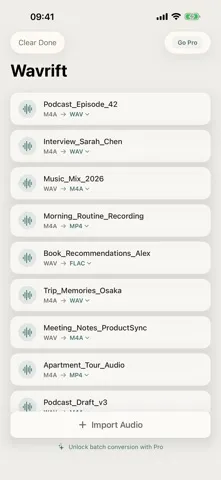
Every conversion stays in a list with its source format, target format, and file size. - No account anywhere
Nothing to sign up for, nothing to sync, and it works with no network at all.
WHO IS WAVRIFT FOR?
- Podcasters and interviewers turning recordings into the format their editor wants
- Musicians archiving WAV sessions as 24-bit FLAC
- Anyone handed an M4A that some other app refuses to open
- People who would rather not upload personal audio to a conversion website
PRICING
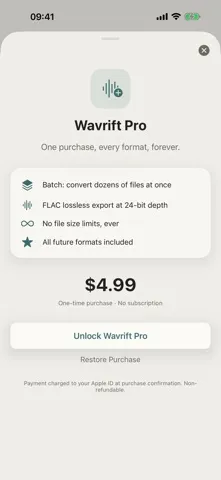
Included: on-device conversion between M4A, WAV and MP4, and the full conversion history. Wavrift Pro is a one-time in-app purchase — no subscription — and adds batch conversion of several files at once, FLAC lossless export at 24-bit, no file size limits, and any future formats.
FEEDBACK
Made by a small indie team. Email obeliskclubclub@gmail.com with feedback, bug reports, or feature requests.
Note: MP3 and OGG export are not offered, because Apple's built-in audio encoder does not write them.
Terms of Use (EULA): https://obelisk.club/wavrift/terms
Core Capabilities
Convert audio — or the audio track of any video — to M4A, WAV and MP4 on device
FLAC lossless export at 24-bit depth (Pro)
Batch conversion of several files at once (Pro)
Keeps source quality by default — sample rate and channels stay untouched
A history list of everything you have converted
No account and no uploads — works fully offline
Interface
High Fidelity UI
High Fidelity UI
High Fidelity UI
More from Obelisk
SnapPro
Pixel-perfect capture, unlimited recording, on-device OCR — included at no additional purchase.
ViewOne
Your iPhone fired off 50 burst photos at the playground. Now they're sitting on your Mac, and you can't bring yourself to sort through them. ViewOne fixes that.

PhotoBridge
No third-party cloud. No subscription to a stranger's photo silo.
How Wavrift compares
Honest, dimension-by-dimension comparisons — including where the other tool wins.