
About
Hexnut is the fast, no-nonsense hex color picker. It does one job cleanly: get exact color codes and copy them in a tap. No accounts, no ads, no tracking — and it works fully offline.
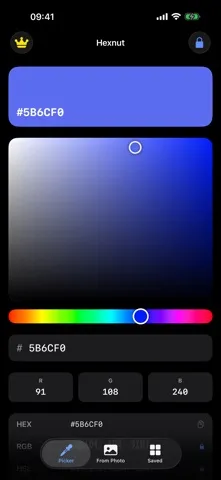
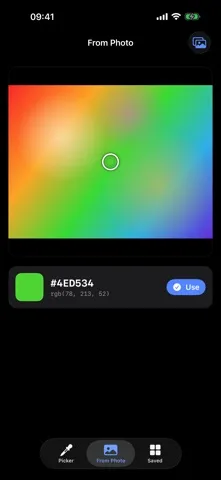
Drag the saturation/brightness field and hue rail, fine-tune R, G, and B, or just type a hex code. Load a photo and drag the loupe to read the exact hex of any pixel.
WHAT MAKES HEXNUT DIFFERENT
- Precision picker
A saturation/brightness field, a hue rail, 0–255 R/G/B fields, and direct hex entry all drive the same live preview. - Sample from any photo
Drag the loupe across a photo and read the exact hex and RGB of the pixel beneath it. A generated sample image is already loaded, so the tab is useful the moment you open it. - Harmony palettes
Generate complementary, analogous, triadic, split-complementary, and monochromatic sets from the color you are holding. - Contrast you can trust
See the WCAG contrast ratio against white and black with AA / AAA badges, so you can judge readability before you commit to a color. - Every format, one tap
HEX, RGB, HSL, HSB, SwiftUI Color, UIKit UIColor, and a ready-to-paste CSS declaration. Tap a row to copy it. - Fully offline
No account, no ads, no tracking, no network calls. Colors you save stay in local storage on your device.
WHO IS HEXNUT FOR?
- Designers matching a color they spotted in a screenshot, a mockup, or the real world
- iOS developers who want SwiftUI Color or UIColor code without doing the math
- Web developers who need a hex, an rgb() value, or a CSS declaration to paste
- Anyone who wants a color picker that never asks for an account
PRICING
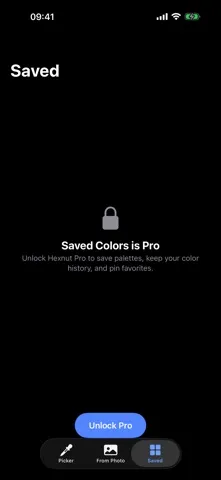
Included: the full picker, photo sampling, harmony palettes, the WCAG contrast checker, and one-tap HEX copying. Hexnut Pro is a one-time in-app purchase — not a subscription — and adds the Saved tab with color history and pinned favorites, plus one-tap copying of RGB, HSL, HSB, SwiftUI Color, UIKit UIColor, and CSS.
FEEDBACK
Made by a small indie team. Email obeliskclubclub@gmail.com with feedback, bug reports, or feature requests.
Built with native Apple frameworks for iPhone.
Learn more: obelisk.club/hexcolorpicker
Terms of Use (EULA): https://obelisk.club/hexcolorpicker/terms
Core Capabilities
Precision picker: saturation/brightness field, hue rail, R/G/B fields, and direct hex entry
Sample the exact hex of any pixel in a photo with a draggable loupe
Harmony palettes: complementary, analogous, triadic, split-complementary, and monochromatic
WCAG contrast ratio against white and black with AA / AAA badges
Fully offline — no account, no ads, no tracking, no network calls
Pro: saved history with pinned favorites, plus RGB, HSL, HSB, SwiftUI, UIKit, and CSS copying
Interface
High Fidelity UI
High Fidelity UI
High Fidelity UI
More from Obelisk

SnapPro
Pixel-perfect capture, unlimited recording, on-device OCR — included at no additional purchase.

ViewOne
Your iPhone fired off 50 burst photos at the playground. Now they're sitting on your Mac, and you can't bring yourself to sort through them. ViewOne fixes that.

PhotoBridge
No third-party cloud. No subscription to a stranger's photo silo.
How Hexnut compares
Honest, dimension-by-dimension comparisons — including where the other tool wins.