WavriftAudio Converter & Format Tool
About
Wavrift converts audio files on your device in seconds — no uploads, no account, no limits on basic use.
Drop in a file, pick your format, tap Convert. That's it.
WHAT MAKES WAVRIFT DIFFERENT
- Fully on-device conversion
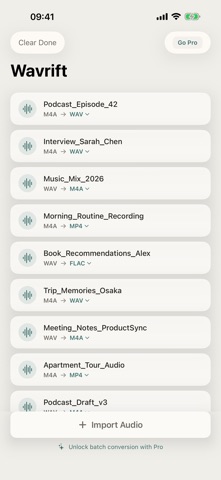
Every format change happens locally; your audio never leaves your device. M4A → WAV, MP4, M4A and WAV → M4A, MP4, WAV, with no cloud step in between.
- FLAC lossless export (Pro)
Export WAV or M4A to FLAC at 24-bit lossless depth.
- Batch conversion (Pro)
Select and convert multiple files at once instead of one at a time.
- No file size limits (Pro)
Convert large audio files without a cap.
PRICING
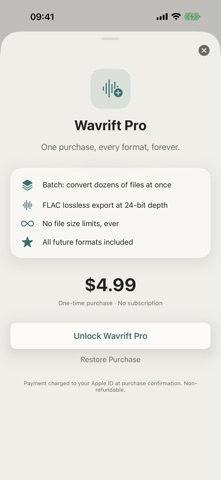
Wavrift is free to use for on-device format conversion, with no account and no limits on basic use. Wavrift Pro is a one-time unlock — no subscription — that adds batch conversion, FLAC export at 24-bit lossless depth, no file size limits, and all future formats.
FEEDBACK
Made by a small indie team. Email obeliskclubclub@gmail.com with feedback, bug reports, or feature requests.
Terms of Use (EULA): https://obelisk.club/audioconverter/terms
Core Capabilities
Convert M4A, WAV, and MP4 audio — fully on device
Batch conversion for multiple files at once (Pro)
FLAC lossless export at 24-bit depth (Pro)
Interface
High Fidelity UI
High Fidelity UI
High Fidelity UI
More from Obelisk

SnapPro
SnapPro is the professional screenshot and screen recording tool macOS deserves. Pixel-perfect capture, unlimited recording, on-device OCR —…

ViewOne
Your iPhone fired off 50 burst photos at the playground. Now they're sitting on your Mac, and you can't bring yourself to sort through them.…

PhotoBridge
PhotoBridge backs up your iPhone photos directly to storage you own — Synology, QNAP, Nextcloud, AWS S3, MinIO, Aliyun OSS, or an external d…
How Wavrift compares
Honest, dimension-by-dimension comparisons — including where the other tool wins.