
QuickPix오프라인에서 이미지를 한 번에 압축
About
QuickPix는 Mac에서 완전히 로컬로 동작하는 빠른 네이티브 macOS 이미지 압축기입니다. 업로드도, 계정도, 텔레메트리도 없습니다. 끌어다 놓기만 하면 됩니다.
Apple이 내부적으로 사용하는 macOS 표준 sips 엔진을 기반으로 하므로 출력 품질은 미리보기의 내보내기와 동일하고, 속도는 CLI 수준이며, 사용성은 GUI 그대로입니다.
QuickPix의 차별점
- 100% 오프라인
이미지는 절대 Mac을 떠나지 않습니다. 서버 업로드도, 제3자 처리도 없습니다. 내부 스크린샷, 미공개 제품 렌더, 클라이언트 작업 등 인터넷에 올리고 싶지 않은 자료를 안전하게 다룰 수 있습니다.
- 읽기 28종, 쓰기 12종
JPEG, PNG, HEIC, WebP, TIFF, GIF, BMP, PSD, JPEG 2000과 캐논·니콘·소니·후지필름·올림푸스·파나소닉·펜탁스의 RAW 파일을 읽습니다. 쓰기는 HEIC, PNG, JPEG, TIFF, GIF 등 12종입니다.
- 다섯 가지 압축 프리셋
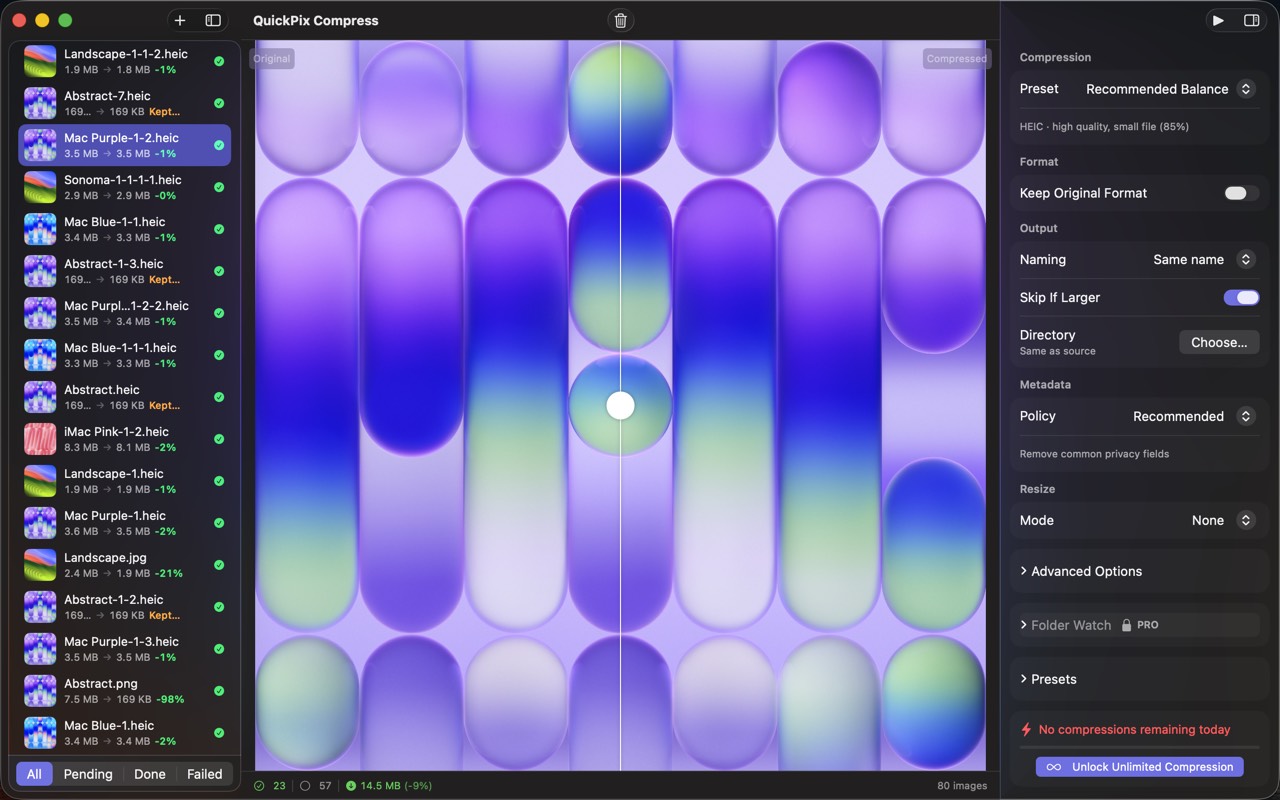
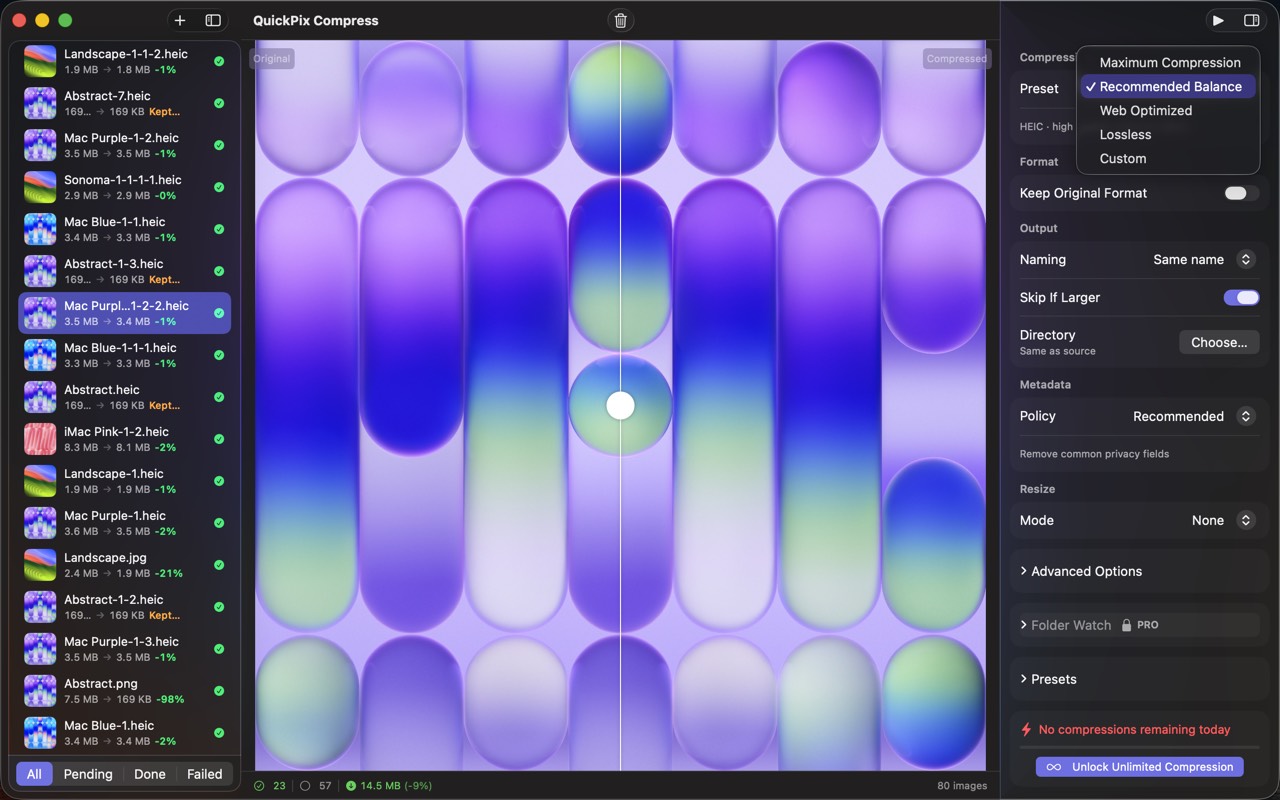
최대 압축, 권장 균형, 웹 최적화, 무손실, 또는 포맷과 품질을 직접 지정. 압축 후 오히려 커지는 파일은 건너뛸 수 있습니다.
- 한 번에 처리하는 수량 제한 없음
1,000장이든 10,000장이든 한 번에 처리합니다. 일일 제한도, 일괄 처리 수량 제한도 없습니다.
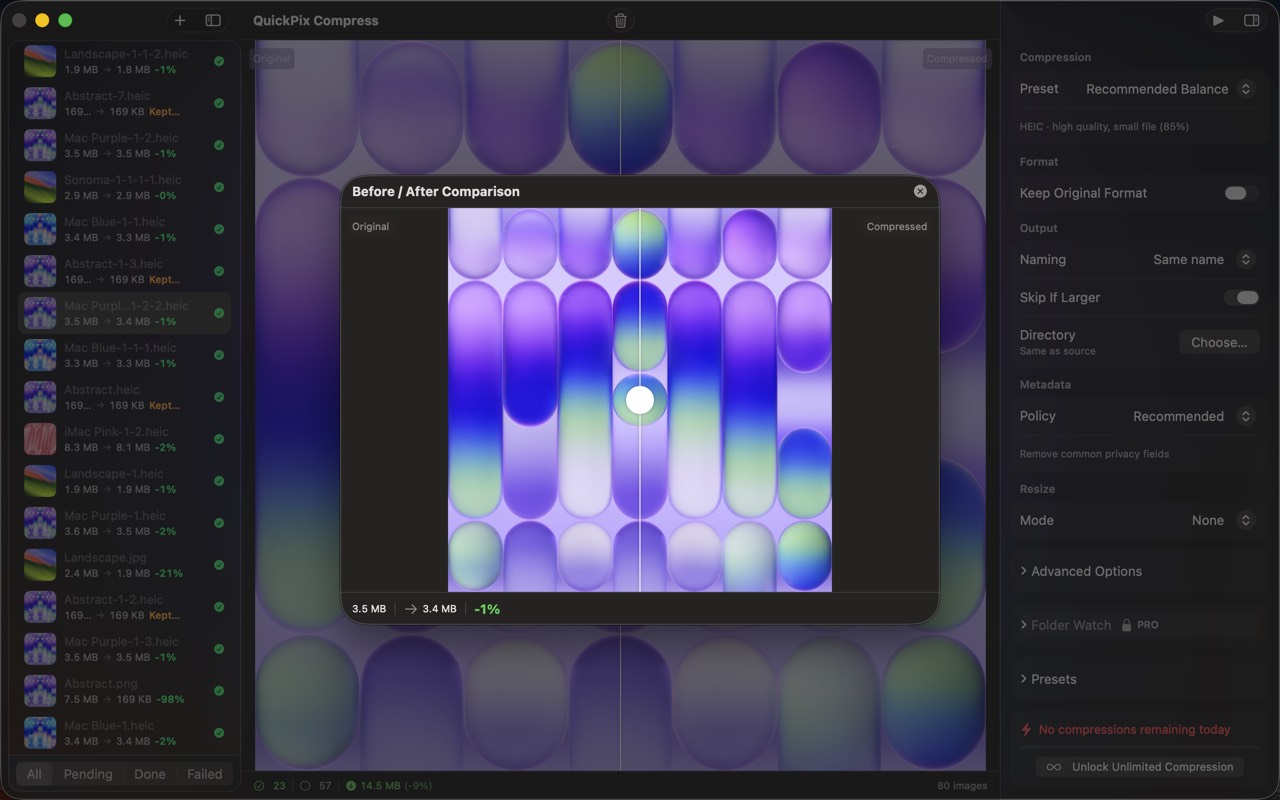
- 비포 / 애프터 슬라이더
픽셀 단위 확대가 가능한 시각 비교를 내장. 파일 크기 숫자만 믿지 말고 실제 품질 차이를 확인한 뒤 내보내세요.
- 폴더 감시 (Pro)
폴더를 지정해 두면 새로 추가되는 파일을 자동 압축합니다. Dropbox, Slack, Finder로 자료를 받는 디자이너와 팀을 위해 설계되었습니다.
- 컬러 프로파일 보존
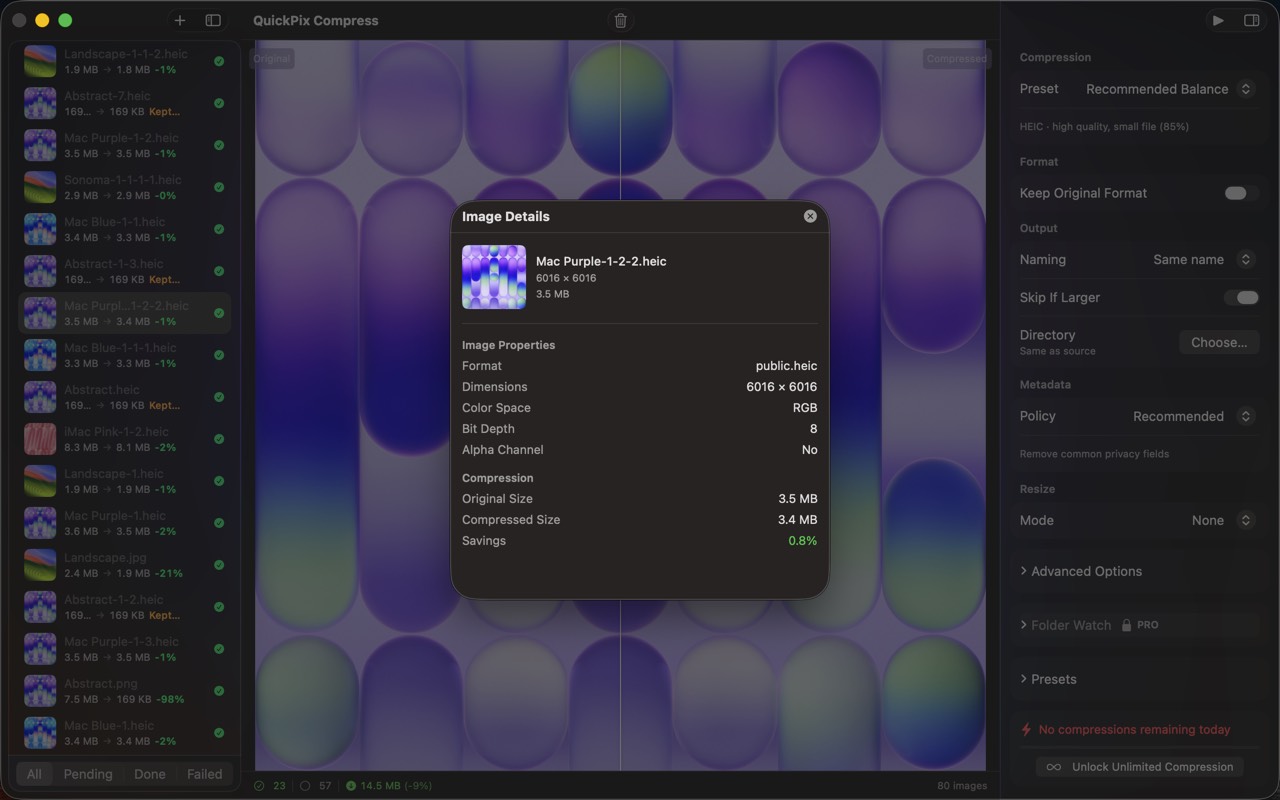
sRGB는 sRGB, Display P3는 Display P3 그대로 유지. 공유에 적합하도록 EXIF와 GPS는 기본 제거되며 Pro에서는 특정 메타데이터를 유지할 수 있습니다.
- 클립보드에서 붙여넣기
어디서든 ⌘⇧V. 공유 전에 스크린샷을 압축해야 하는 상황에 특히 유용합니다.
누구를 위한 앱인가?
- CMS, 디자인 시스템, 마케팅 사이트에 이미지를 올리는 디자이너
- 이미지 중심 웹앱을 만드는 개발자
- 구독 없이 일괄 처리해야 하는 제품 사진가
- JPEG, PNG뿐 아니라 HEIC와 RAW도 압축해야 하는 분
- 웹 압축 도구의 일괄 20장 제한에 부딪쳐 본 분
가격
기본 기능은 영구 무료, 단일 포맷 일괄 무제한, 전 포맷 지원. 일회 결제 Pro로 폴더 감시, 사용자 프리셋, 병렬 일괄 처리가 열립니다. 구독은 없습니다.
피드백
개발자 Peter Zhang. obeliskclubclub@gmail.com으로 오는 메일은 모두 직접 읽습니다. 필요한 포맷이 빠져 있다면 알려주세요.
자세히 보기: obelisk.club/quickpix-image-compressor
Core Capabilities
프리셋 하나로 압축
최대 압축, 권장 균형, 웹 최적화, 무손실, 또는 포맷과 품질을 직접 지정. 압축 후 오히려 커지는 파일은 건너뜁니다.
배포 전에 화질 확인
픽셀 단위로 확대되는 비포/애프터 슬라이더와, 알파 채널·해상도·색 공간을 고려한 포맷·품질 추천을 제공합니다.
읽기 28종, 쓰기 12종
JPEG, PNG, HEIC, WebP, TIFF, GIF, BMP, PSD, JPEG 2000과 7개 제조사의 RAW를 읽고, HEIC, PNG, JPEG, TIFF, GIF 등 12종으로 씁니다.
Frequently Asked Questions
- Does QuickPix upload my images to a server?
- No. QuickPix runs 100% offline on your Mac — no upload, no account, no telemetry. Internal screenshots, unreleased renders and client work never touch the internet.
- Can QuickPix compress HEIC photos from an iPhone?
- Yes. HEIC is supported natively, alongside 28+ formats including JPEG, PNG, WebP, AVIF, TIFF, GIF, BMP and PSD — both reading and writing.
- Is there a limit on how many images I can compress at once?
- No daily caps and no per-batch limits — drop a folder with 1,000 or 10,000 images and get a compressed folder back.
- Will compressing change my photo's colors or metadata?
- Color profiles are preserved — sRGB stays sRGB and Display P3 stays Display P3 — while EXIF and GPS metadata are stripped by default for safer sharing.
- Can QuickPix compress images automatically?
- With Pro's folder watching, pick a folder and anything dropped into it is compressed automatically — built for designers and teams receiving assets via Dropbox, Slack or Finder.
Interface
High Fidelity UI
High Fidelity UI
High Fidelity UI
High Fidelity UI
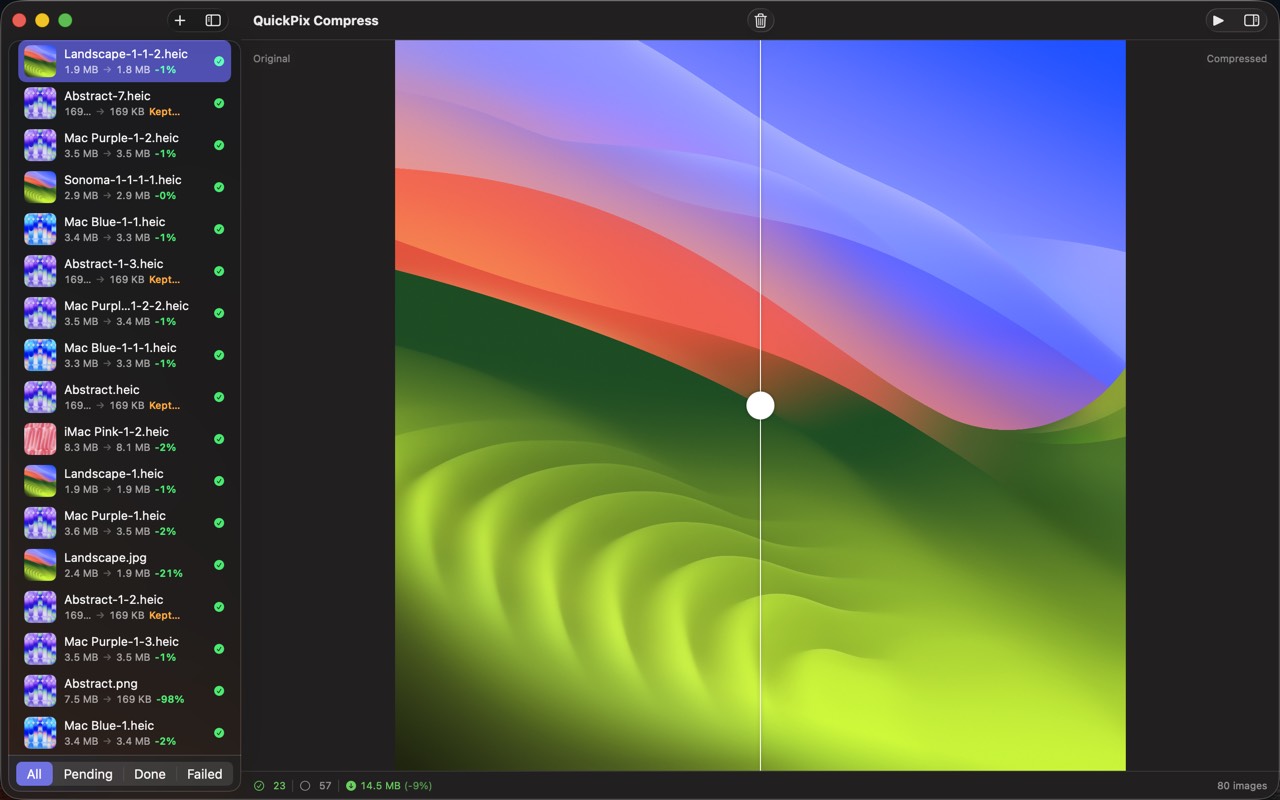
High Fidelity UI
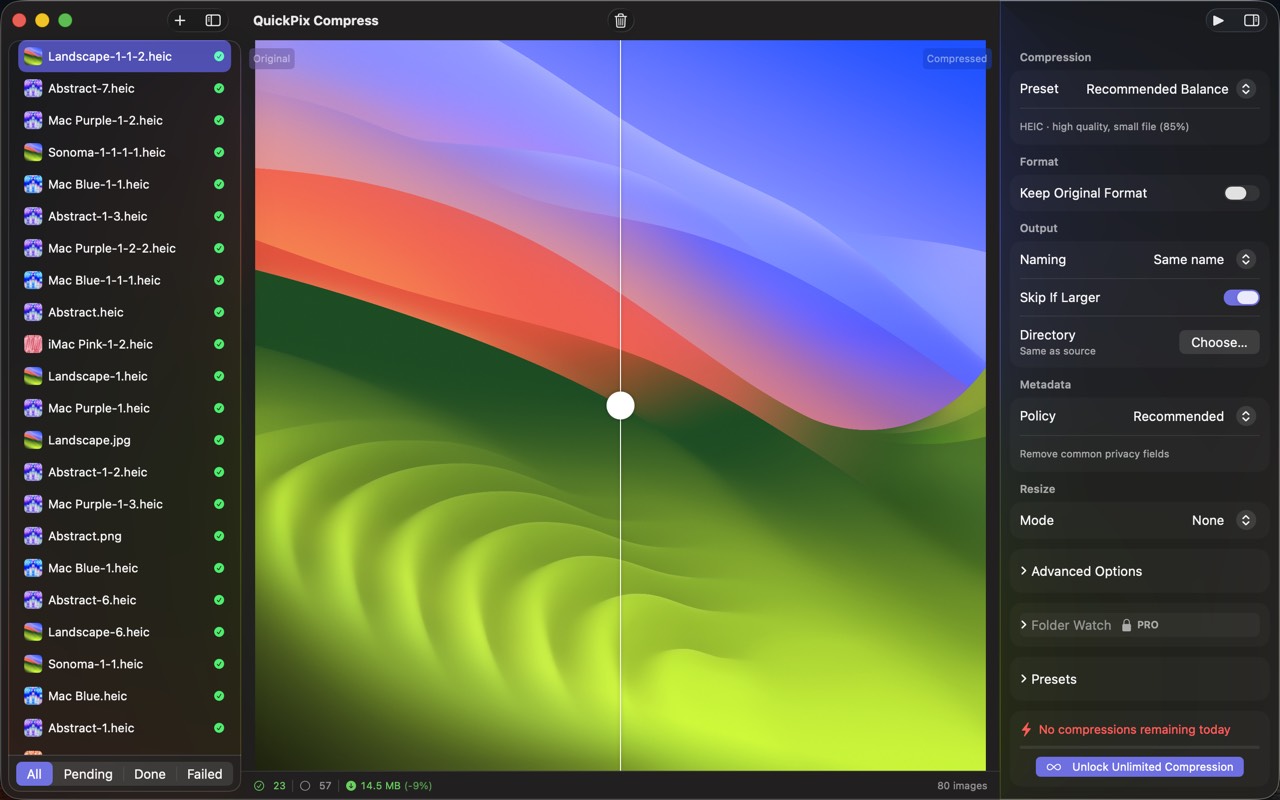
High Fidelity UI
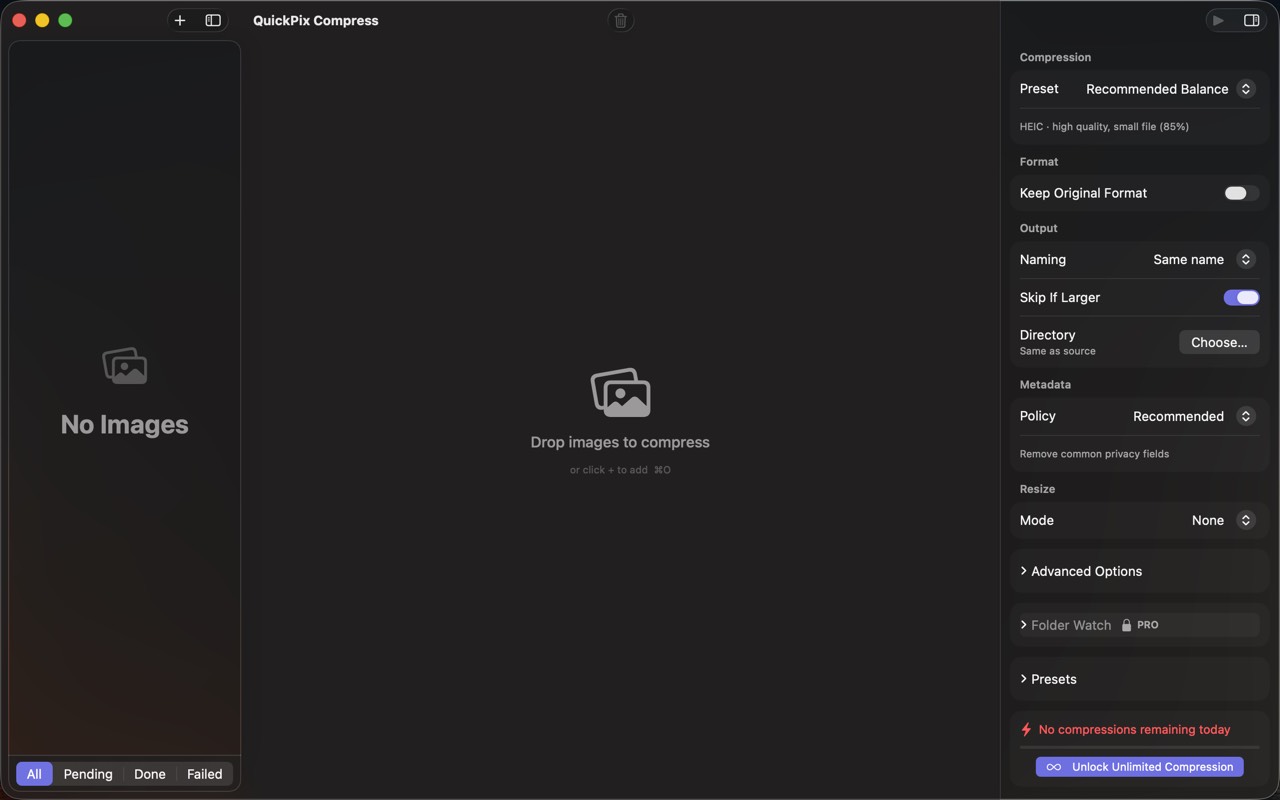
High Fidelity UI
Guides for QuickPix
Squoosh on Mac — what it's great at, why it can't open HEIC, and offline alternatives
Squoosh is the best free way to compress one image in a browser. But it can't decode iPhone HEIC photos, has no batch mode, and its CLI is archived. Here's when it fits and what Mac users switch to.
How to compress HEIC images for a website on Mac
HEIC is efficient but not universal on the web. Learn when to use JPEG, WebP, or AVIF, how to resize and strip metadata, and how to batch offline on Mac.
WebP vs AVIF vs JPEG on Mac — when to use which (with real file-size numbers)
Three modern image formats, three different trade-offs. Here's a real-world test on Mac, with concrete recommendations for web, design, and archival use.
macOS sips command — the complete guide (2026)
Every Mac ships with a fast, sandbox-safe image processor called sips. Resize, convert, compress, strip metadata, batch — without installing anything. Here's everything it can do.
How to convert HEIC to JPEG on Mac in batch (4 ways, ranked)
iPhone photos are HEIC by default. Sending them to Windows, Android, or older web tools means converting. Here are the four practical ways on Mac.
How to compress images on Mac without uploading them anywhere (2026)
A practical guide for shrinking PNG, JPEG, HEIC, and WebP images on macOS while keeping every byte on your own machine — with five real options compared.
More from Obelisk

SnapPro
SnapPro is the professional screenshot and screen recording tool macOS deserves. Pixel-perfect capture, unlimited recording, on-device OCR —…

ViewOne
아이폰으로 놀이터에서 연속 촬영 50장. 이제 Mac에 쌓여 있는데, 한 장씩 골라낼 엄두가 안 납니다. ViewOne이 해결해 드립니다. 폴더를 끌어다 놓으면 ViewOne이 모든 연속 촬영 그룹을 즉시 찾아냅니다. 나란히 비교하고 마음에 드는 사진…

PhotoBridge
PhotoBridge backs up your iPhone photos directly to storage you own — Synology, QNAP, Nextcloud, AWS S3, MinIO, Aliyun OSS, or an external d…
How QuickPix compares
Honest, dimension-by-dimension comparisons — including where the other tool wins.
Mac image compression
QuickPix vs ImageOptim
ImageOptim is a beloved open-source image compressor for Mac. Designers and developers have used it for over a decade. QuickPix is a newer entrant that takes a different technical approach. Here's a clear-eyed comparison so you can pick what fits your workflow.
Image compression
QuickPix vs TinyPNG
TinyPNG is the cloud-based image compression standard that millions of designers use daily. QuickPix is a Mac-native alternative that runs entirely on your device. Both produce smaller JPEGs and PNGs. The key difference is whether your images ever leave your computer.
Image compression
QuickPix vs Squoosh
Squoosh is Google's open-source web-based image compressor that runs entirely client-side in your browser. QuickPix is a native Mac app with similar privacy guarantees but a different workflow. Here's how they actually compare.
JPEG compression
QuickPix vs JPEGmini
JPEGmini is a long-running commercial JPEG optimizer for Mac with a proprietary algorithm that produces some of the smallest JPEGs in the industry. QuickPix is a newer macOS-native compressor built on Apple's sips engine. Both compress images well — here's how to decide.